You might have already come across various DVD rippers in the market. Of course, we have got some of the best DVD Rippers such as Winx DVD Ripper and Handbrake. But people often get confused with the options or the choices that they have for. It generally becomes difficult for people to choose the right DVD ripper, especially when it comes to the comparison between Winx DVD Ripper and Handbrake. Don’t worry; here we have got the best comparison for Winx DVD Ripper and Handbrake.
We have always assumed that having the best ripper will provide the right safety and security and of course the best easiness to watch. Hence, it is the best idea in order to rip the DVDs within the computer or even to your laptop, if you have a DVD drive. You can get the best of the ripping software that would help you get through the best of the ripping.
But which one to choose between the Winx DVD Ripper and Handbrake. Here we have got the strengths of Winx DVD ripper when in compared with Handbrake.
Table of Contents
Winx DVD Ripper vs. Handbrake
Here are some best strengths and comparisons between Winx DVD Ripper and Handbrake.
Functions
Winx the name itself says it is for the Windows system. It is the windows and Mac operating system ripping software for the DVDs. Of course, both the rippers are basically a freeware and can be used quite easily. Winx can be worked on both Windows and Mac. It can simply rip the videos into various video formats such as WMV, MP4, FLV, MPEG, MOV, or DVD to iPod, iPhone, Android, Apple, PSP and a lot more.
Handbrake is free too. But it is generally not preferred by most of the users. In fact, Winx is recommended by the top technicians and the experts. It can rip the Blu-Ray DVD sources and other videos files as such.
Input
When it comes to Input Winx can simply work on various input parts such as DVD 5, DVD ROM, DVD 9, DVD+R, DVD-R, DVD+RW, DVD-RW and a lot more. It can simply rip any DVD with the RCE, APC, Region code, Sony, CSS and a lot more. Winx can also rip several third-party software and even the Disney DVDs.
The Handbrake can only rip the non-protected or insecure DVDs. It cannot even rip the CSS or encrypted DVDs. Also, it doesn’t support the third party software.
Output
Winx can produce various video formats such as MP4, MPEG, WMV, MOV, FLV, HTC, Samsung, JPEG, BMP, Apple and H.264.
Whereas, handbrake produces a very limited number of video formats when started to rip the DVDs. It can deliver MP4, MKV, android, apple, and Windows.
Speed and Quality
Winx is very easy and simple to use and operate when it comes to the usage for the users. Handbrake is easy too, but not as compared to Winx. Also, Winx is 4x times faster the Handbrake. Winx does these ripping works in a limited time with the best of the quality ofthe videos that you have ripped.
How to rip DVDs into digital files?
Here are two methods using which you can rip DVDs into the digital files.
Rip DVDs with Winx DVD Ripper
- Firstly, you have to download the Winx DVD Ripper software.
- Once entered, just land in the website and download the Winx premium version. You can avail this app for both Windows and Mac.
- Once downloaded, just keep following the instructions. Just keep the disc or the DVD on the DVD slot of your computer system. You will now have to click and choose the disc option and it will detect the files to extract.
- Now, you just have to select the source DVD disc. You will see many formats and the presets to be converted into. Just rip after that, and you have to follow the further instructions once done.
Rip DVDs with Handbrake
- You just have to download the Handbrake software.
- Once downloaded, just install it as per the instructions displayed within it.
- Now after the installation, just open the software and you will see the source option, just click and select the source.
- Once done, just follow the further instructions and settings as per your own convenience and rip the DVDs.
- Once ripped, you can simply open the output file and view it.
Features of Winx DVD Ripper
Here are some great and killer features of Winx DVD Ripper software that you must never miss to know.
User-friendly Interface
It has got the best interface that will help the users to get the best out of it. You don’t have to worry about it anymore if you want to use the Winx DVD Ripper for ripping the videos and the movies into various and different formats.
Fast ripper
It is one of the best ripper and of course the speediest ripper that you would have ever used to rip the videos into various formats. You can also use other rippers, but this outputs the best quality.
Supports various formats
The Winx DVD Ripper supports various video formats outputs. Also, it supports various and different types of DVDs. Hence, you can do any type of ripping with its help.
Good quality
Winx DVD Ripper provides the best and the great quality of images. You can simply copy the DVD and rip it. You will get the unique image or the picture quality of the videos that you always wanted.
Download the Winx DVD Ripper software
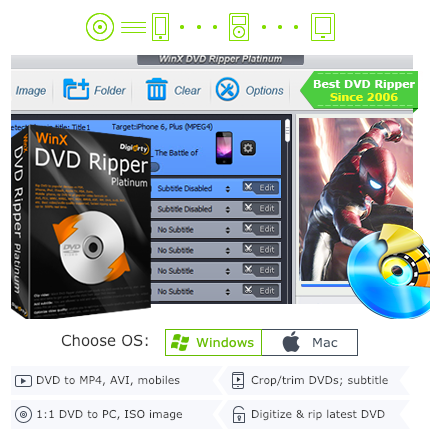
- You have to download the software from the official website. You can also give a visit to www.winxdvd.com.
- Once entered the website, just search for the software and download it on your computer system.
- After that, you just have to keep following the instructions after you have downloaded.
- One done with the installation process, just make sure to insert the disc into the drive slot and follow the further procedure to rip the DVD.
- You can select the source file as in the input file and the output folder to save the ripped file in your computer system.
Conclusion
You can always look out for the best offer in order to get the Winx DVD ripper in the respective website. Of course, if you can visit and avail the giveaway offers, then you just have to visit https://www.winxdvd.com/event/dvd-ripper.htm.
Leave a Reply