Unlock Bootloader of Xiaomi Mi A1: To unlock the bootloader of any Xiaomi Phone, you need to follow the traditional lengthy procedure of Xiaomi. Usually, you need to take permission from Xiaomi to unlock the bootloader of any Xiaomi Phone. But, you don’t need to follow the traditional method of unlocking the bootloader in Mi A1. It takes less than 30 seconds to unlock the bootloader of Mi A1.
Prerequisites:
- Obviously, your Xiaomi Mi A1- Android One Smartphone.
- USB type C cable
- Windows computer(This method will not work on Mac).
- ADB Drivers from the downloads section.
Also Check: Amazing facts of Mi A1
Unlock Bootloader on Xiaomi Mi A1
- On your Mi A1, navigate to the settings. At the bottom, go to about phone. Click on “Build Number” for seven times. This will enable the developer option on your Mi A1.

- Go back the settings main section. At the bottom, you will see developer option which is above the About Phone. Open developer options. Enable OEM unlocking and USB debugging.
Also Check: Mi Basic In-Ear Headphones
- Power off the Mi A1. Press volume down and power button for few seconds. Mi A1
- With the help of USB type c cable, connect your Xiaomi Mi A1 to the computer.
- On your computer, download the ADB drivers.
Also Check: MTK Drivers - Open the command prompt on your PC.
- Type “fastboot oem unlock” and it will unlock the bootloader of Mi A1.

- To check the status of bootloader on Mi A1, type “fastboot oem device-info“.
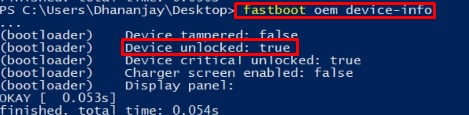
- Congratulations for unlocking the bootloader on Mi A1.
Also Check: Tips & Tricks with Mi A1 and Redmi Y1 Tips & Tricks
Downloads:
Also Check: How to root Mi A1 without TWRP
Video Guide to unlock bootloader of Mi A1
Also See: How to Install Official Android Oreo on Mi A1
Final Verdict:
This is the easiest method to unlock the bootloader of Xiaomi Mi A1. If you find any difficulty to unlock the bootloader of Xiaomi Mi A1, then ping me in the comments area. I will help you with the best possible solution. Soon, I shall make guides on installing the custom recovery TWRP on Mi A1 and rooting Mi A1.
Leave a Reply